Plans
Every organization starts on the free Seed plan. Upgrade when you need more stores, products or warehouses. No plan takes a commission: your sales are 100% yours.
Compare plans
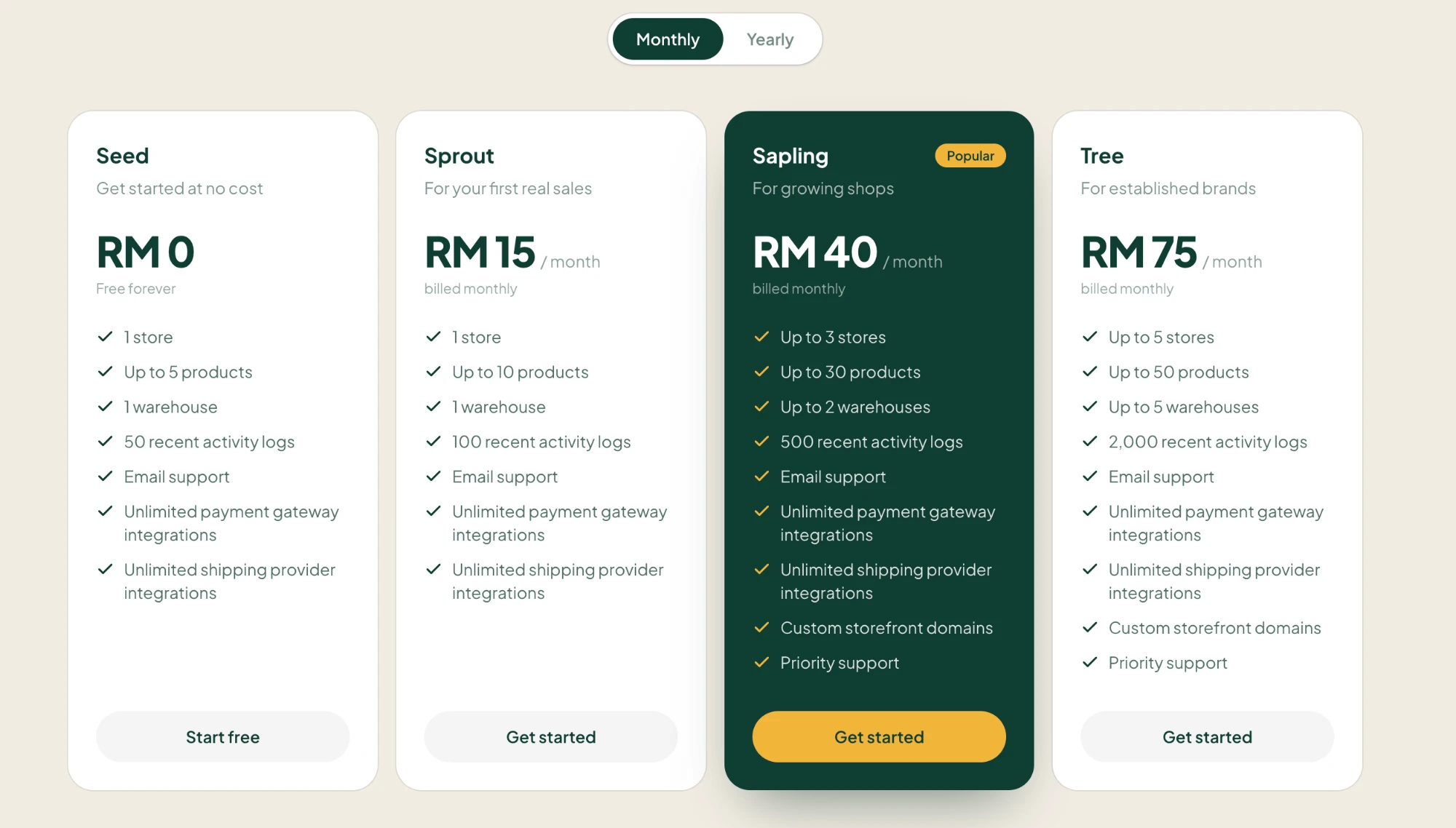
Paying yearly costs the same as 10 months, so you get 2 months free. Current prices are always on gerai.digital.
- Seed: try Gerai Digital and list your first few products.
- Sprout: your first real sales, with a few more products.
- Sapling: several stores, or your own domain such as yourshop.com.
- Tree: an established brand with more stores, products and warehouses.
Change your plan
- In your dashboard, go to Billing and choose Change plan.
- Pick Monthly or Yearly, then choose a plan.
- Confirm. Paid plans are charged to your card through Stripe. The first time, you add your card here.
Only team members allowed to manage billing can change the plan.
Upgrading
An upgrade starts straight away. You pay the difference for the rest of your current period, and the amount is shown before you confirm.
Downgrading
A move to a smaller plan, or from yearly to monthly, starts at the end of the period you've paid for. You keep your current plan and its limits until then, and you can change your mind before it starts.
If you're using more than the smaller plan allows, for example more stores or products, you may need to remove some first.
Cancelling
To stop paying, downgrade to Seed. Your paid plan stays active until the end of the period, then moves to Seed and doesn't renew.
Plan fees aren't refundable, including any unused part of a period. See the Refund and Cancellation Policy for the exceptions.
If a payment fails
If a renewal payment fails, your plan has a 7-day grace period. Your stores stay live while you update your card or pay. If it's still unpaid after that, the plan lapses and stores above the free plan's limits go offline until you pay. Your dashboard keeps working throughout.